One familiar button
Add via MacTools appears inside the native Steam store. Choose a manifest source or import a .lua or .zip file.
 MacTools BETA
A LuaTools-inspired Steam tools app for Mac. Bring a familiar manifest workflow to native macOS Steam with a small companion built for Apple Silicon.

Right where it belongs.
MacTools lives quietly in your menu bar and adds a familiar button to Steam game pages. Sign in to lua.tools, choose your source, and bring your manifest into your library.
Add via MacTools appears inside the native Steam store. Choose a manifest source or import a .lua or .zip file.
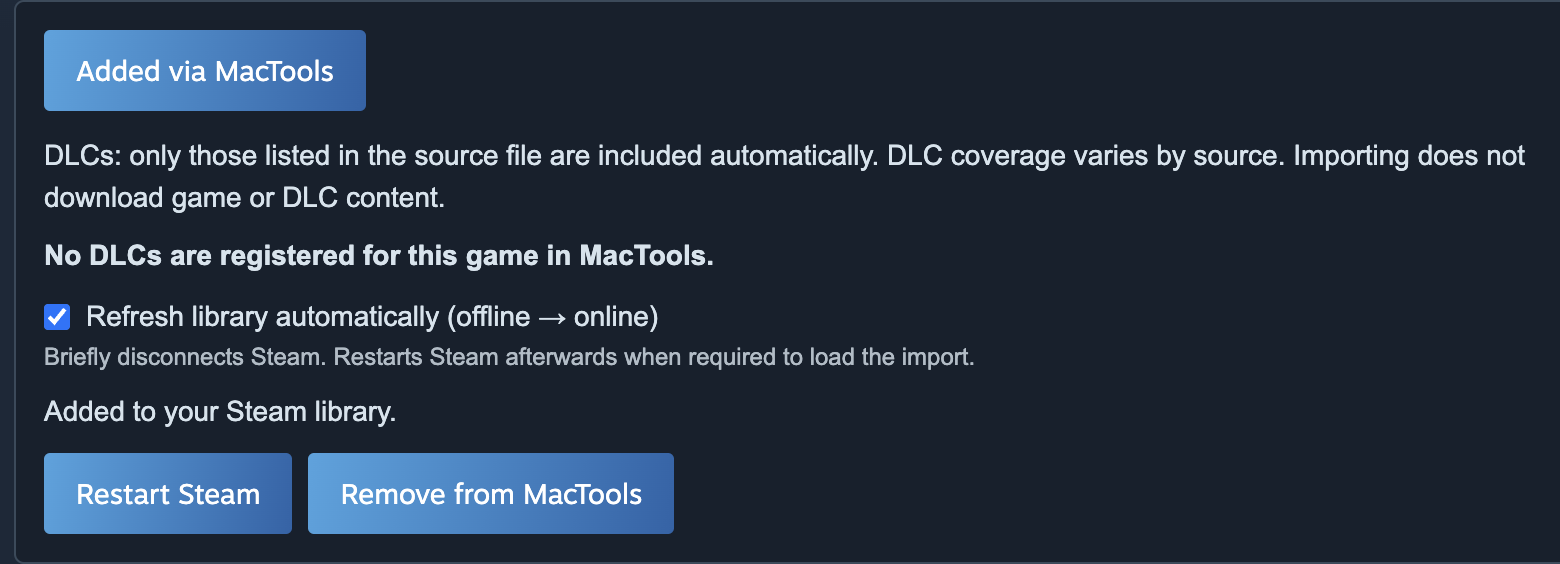
See the entries included in your import. Only DLCs listed in that source are registered; the app does not download game or DLC content.
Choose automatic offline → online refresh after an import. Steam restarts when the runtime needs it.
MacTools works well alongside notProton in our tested setup. MacTools handles manifest imports; notProton brings the Steam Play experience for compatible Windows games through CrossOver.
Install notProton separately. Compatibility varies by game, Steam build and CrossOver setup. This is not a promise that every game will run.
MacTools is a personal project in active development. Your monthly support helps me keep improving it — and gives you access to the current beta.
Steam changes. Compatibility can change with it. Expect rough edges, updates, and a project that is still finding its feet.
Support the development because you want to see it grow. Check the requirements before joining.
A few things to know ↓Monthly support. Beta access while you’re subscribed.
Account registration and subscriptions will open after setup is complete. No payments are being taken.
Understand the native Steam workflow, Apple Silicon requirements and compatibility limits.
Follow the Add via MacTools workflow, source selection, DLC details and library refresh.
A native Swift menu bar companion inspired by lua.tools and SteamTools. It imports manifest entries and adds the Add via MacTools workflow to native macOS Steam, using the macSteam runtime.
An Apple Silicon Mac with macOS 15 or later. The included runtime targets Steam build 1788652215; newer builds may need a runtime update. A lua.tools account is needed for its download service. notProton and CrossOver are separate, optional dependencies for compatible Windows games.
Your first activation binds the key to one Mac. A second Mac is refused. If you replace your computer, contact support to transfer the activation. The app periodically validates access and can work offline for up to 24 hours, within your paid period.
Cancel through your account. Access continues to the end of the period you’ve already paid for, then new MacTools imports are disabled. MacTools does not delete your Steam games.
No. Your support is for MacTools development and access to its beta service. It does not include game purchases, game files, DLC purchases or a guarantee of compatibility. Use imports only for content you are entitled to use.
lua.tools and SteamTools inspired the workflow. MacTools builds on macSteam, with thanks to LuaTools and notProton. This is an independent community project, not an official port or a Valve product. Source and license notices are available below.